
In this article:
Learn how to assign and remove Auditor seats to manage which users can perform audits using the online template in Logiqc.
What are Auditor seats?
An Auditor seat lets a user complete audits as an Action Officer using the online template.
The number of Auditor seats available depends on your organisation's Logiqc subscription. Additional seats can be purchased from the Logiqc Store under User licences > Auditor Seat.
Before you start
Check the following:
- You have Logiqc Auditor.
- You have the permission (Create and edit users, roles, and teams or Edit system settings) to manage Auditor seat assignments.
- The user you are assigning a seat to has the Action Audit, Compliance and Maintenance tasks permission.
A user must have an Auditor seat before they can be assigned to an audit as the Action Officer.
Approval Officers do not need an Auditor seat unless they also complete audits as an Action Officer.
Q: Does an Approval Officer need an Auditor seat?
A: No. Users do not need an Auditor seat to be the Approval Officer for an audit.
Q: What happens if all Auditor seats are in use?
A: Remove a seat from an existing user or order additional seats through the Logiqc Store.
Q: Who can manage Auditor seat assignments?
A: Users with either the Edit system settings permission or the Create and edit users, roles, and teams permission can manage seat assignments.
Method 1: Via System Settings
Navigate to the Auditor seats control in Audit register settings:
Select Register settings - Audit from the Settings type dropdown, then use the Auditor seats control to add or remove users.
Select Register settings - Audit from the Settings type dropdown. Use the Auditor seats control to add or remove users.
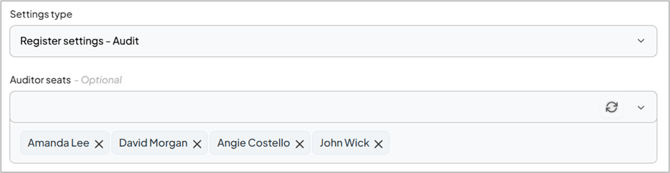
Use the Auditor seats control in Audit register settings to add or remove seat assignments.
Method 2: Via User Profiles
Go to Users, select the user's name link, then select or deselect the Auditor seat checkbox under the User setup section.
Select Users from the left-hand panel.
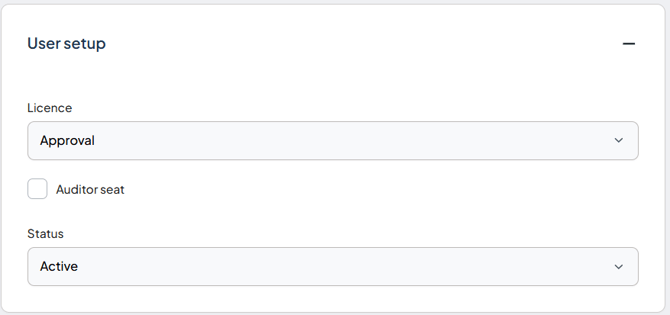
Select or deselect the Auditor seat checkbox on a user's profile to manage their seat assignment.