
New features
Major feature: Related items
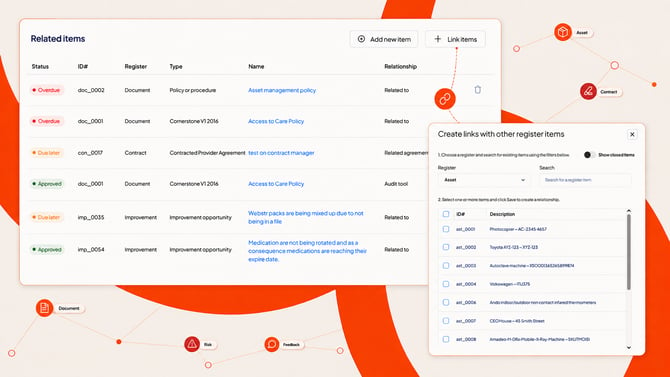
Creating and linking items to other registers just got a lot more consistent. New Related items tabs are replacing the old floating action button (FAB) at the bottom of the page when you open an item.
In any of the new related items tabs, select Add new item to create a new item in another register and link it back automatically, or Link items to search for and connect to something that already exists.
And if your organisation has implemented the Accreditation register, a powerful new option is now available: link an item to a requirement of a standard for accreditation. It will automatically appear on the evidence report showing how you meet the requirements of the standard.
Here is what is changing:
- New related items tabs: Related items replaces the old FAB (Floating Action Button) for related items across all registers, so creating and linking items works the same way everywhere. You'll find specific related register items tabs for quick reference and a new All related items tab showing all items.
- Nothing you rely on has moved: Contracts, Documents, Risk, and Suppliers keep their existing curated tabs, like Standards or Related documents, alongside the new All related items tab.
- Any item, open or closed, can be linked to another item. Multiple items can be linked at once, and items can be linked directly to an accreditation requirement within a standard. Link accreditation requirements: Connect an item directly to a requirement within a standard.
For more information visit About Related items.
ID 1421
Enhancements
AI can now populate injury details for persons involved
When you report an incident, AI-assisted form completion can now populate the injury details for each person involved - nature of injury, location on the body, injury classification, and mechanism of incident - based on the information already entered.
ID 1769
New configurable columns for Documents and Accreditation
Document author, and the additional details of an accreditation requirement, are now available as configurable columns, so you can add them to your own list views.
ID 2294
Platform maintenance and bug fixes
- Clarified how the Archive and Edit open items permissions interact, so this combination no longer produces conflicting behaviour. ID 606
- Improved the experience for reporters without access to an item - they now see the same abridged summary as Report only licence holders, instead of an access error. ID 1786
- Added validation for licence counts when committing master settings. ID 1790
- Increased the column width in Contracts > Financial details > Payment schedule. ID 1845
- Fixed an issue with the AI Search button in Add evidence items. ID 2007
- Fixed an issue where saving a disposed asset could republish it - disposed assets now stay disposed until deliberately republished. ID 2411
- Fixed closed RP tasks incorrectly showing as Overdue. ID 2738
- Fixed the Feedback category not saving correctly when selected. ID 2925
- Fixed an issue preventing some user accounts from being provisioned. ID 3070
- Fixed Android device navigation buttons overlapping the app header and footer on some devices. ID 1782