
This update includes AI assistance for Feedback, clearer asset-booking information, improvements to accreditation work and related-item reporting, and fixes to audit exports and scheduled-item navigation.
New features
AI assistance for Feedback
When AI assistance for Feedback is enabled for your organisation, you can use your description to help populate a feedback report. The assistance works within the Feedback details page, helping you turn an account of a compliment, complaint or other feedback into information you can review. This gives you a starting point for the report, with the suggested details ready for you to check.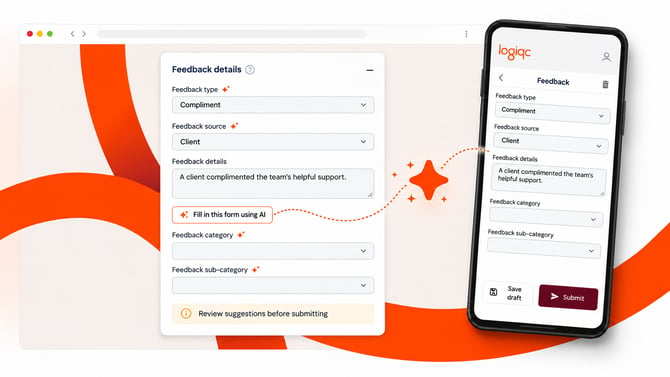
Describe the feedback → fill supported fields with AI → review the suggestions (adapted illustration).
Check the suggested values before submitting, especially dates and times, the people involved and any immediate action. You remain responsible for making sure the report accurately reflects the feedback received.
Enhancements
Save accreditation work before completing the assessment
You can save progress on a published accreditation evidence checklist before you have completed How the requirements are met or selected an Assessment rating. This gives you room to gather evidence and develop your response before finalising the assessment.
Return to the requirement when you are ready to complete those details. Other required fields continue to apply.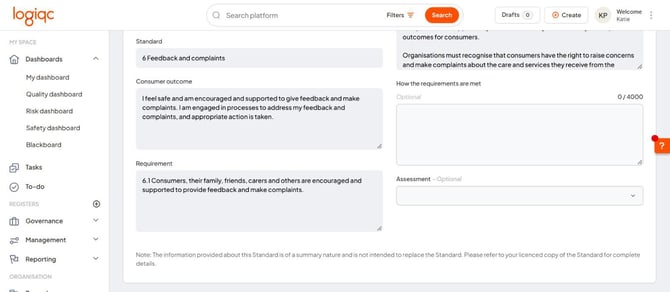
The response and assessment fields are marked Optional.
Clearer information when booking an asset
The asset booking drawers in the Account menu and on each asset’s detail page have been redesigned to be easier to read. The person making the booking and the asset manager can now both see the details entered when the booking was made, plus any notes the user added along the way.
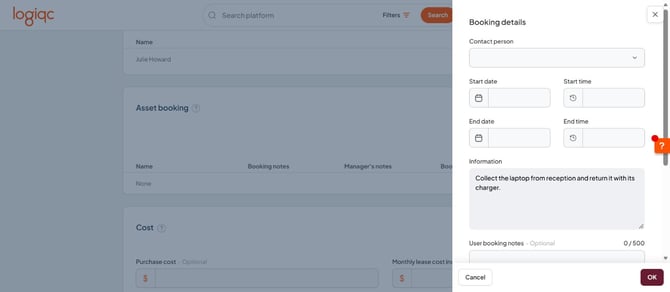
Booking details opened from the asset’s detail page.
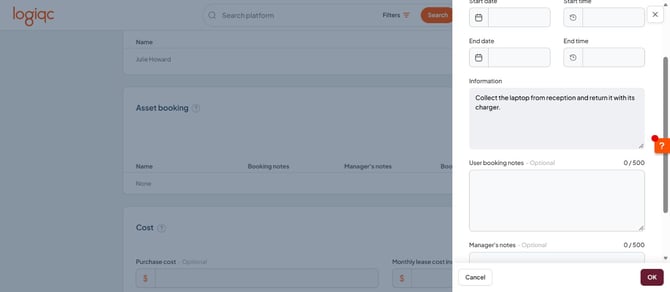
Information contains the asset’s instructions; User booking notes is for your reservation.
Open items with many related items more quickly
Document Register items with many linked records can now open without waiting for the complete related-items list. This helps you to keep working while the related information is retrieved separately.
A loading indicator shows when related items are being retrieved. The change is most useful for frequently referenced items, such as a document linked to many activities. In addition, performance optimisations for the loading of related items generally have been made across all registers.
Customer requests #292298099149 and #292276580835.
New OData API feed for related items
For organisations using the OData API, the AllLinkedItems feed includes all linked items across the platform (excluding accreditation evidence). This means that you can create reports analysing the relationships created between register items such as, Improvements created from incidents and feedback, incidents relating to risks, and repairs or maintenance linked to assets.
Customer request #278956026357.
Platform maintenance and bug fixes
- The Audit questions report exports its chart and displayed table data.
- Attached records appear when you open a scheduled item from the Series tab.
- Asset-booking confirmation emails for organisations using single sign-on include the asset photo and booking notes.
- For organisations using VHIMS, new AI-assisted incident reports avoid validation errors caused by hidden person details. Complete Persons involved manually.