
New features
Major feature: Logiqc AI
Incident reporting just got faster, smarter, and easier. Introducing Logiqc AI—your intelligent assistant designed to draft your Incident Reports in seconds. Free with Pro and Enterprise plans.
Simply click "Fill in this form with AI" on any Incident Report page, and Logiqc AI will analyze the details and suggest values for you to review.
Here’s what makes it powerful:
- 100% Transparency: Watch Logiqc AI think in real time. See its reasoning steps directly in the chat so you know exactly what context it’s checking and why.
- Human-in-the-Loop Control: You’re always in the driver’s seat. Before submitting, simply check off that you’ve reviewed the AI-generated suggestions—ensuring complete accuracy and compliance every time.
Try it today on your next Incident Report and speed up your workflow! (Requires Administrator to opt-in to activate for your organisation)
For more information visit About Logiqc AI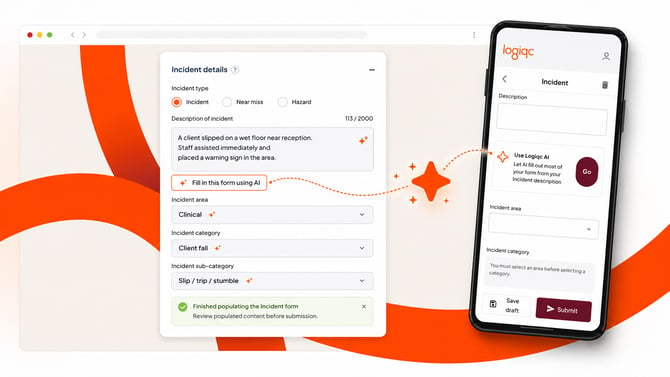 ID ID 1312, 1501
New standard: QIC Health and Community Services Standards, 8th Edition
A new evidence report is now available in the Accreditation register for the QIC Health and Community Services Standards, 8th Edition.
ID 1587
Enhancements
Guided walkthroughs for actioning and approving audits
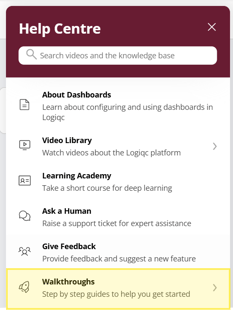
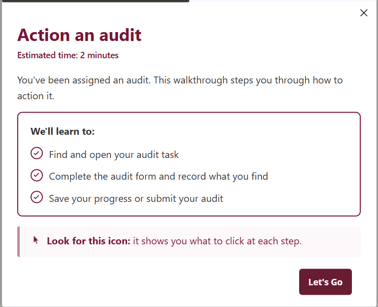
Logiqc Auditor now includes guided walkthroughs for action officers actioning an assigned audit and for approvers reviewing and closing an audit. Find them in the help center.
ID 1261, 1262
Re-publish an archived audit template in Logiqc Auditor
You can now restart an archived Logiqc Auditor audit by cloning it into a new draft, without being blocked by the archived audit's existing title. The new draft keeps the same content and setup as the archived audit.
ID 1578
OData API: Program and Program Manager fields
The OData API now includes Program and Program Manager fields under Funded Programs in Contracts, for reporting and analytics integrations.
ID 1440, Customer request #256890080743
Funding/Supports field for persons involved, now on mobile
The Persons involved component in Feedback and Incident registers now includes the Funding/Supports field on the mobile app, matching web. The field supports multiple selections.
ID 1598
Platform maintenance and bug fixes
- Fixed labels in the Funding/Supports dropdown menu that would intermittently disappear. ID 1595
- Fixed a validation error that occurred when submitting a risk. ID 1596
- Fixed an issue preventing risk settings from saving. ID 1597
- Fixed an issue where the Response protocols section could appear blank. ID 1604
- Fixed an issue where some in-app orders weren't syncing through to the platform. ID 1608
- Fixed an error that could occur when creating a new user. ID 1609
- Fixed an error submitting a risk with more than 200 characters. ID 1610
- Fixed an error saving an accreditation action with more than 200 characters. ID 1612