
New features
Improvements register: New "Area of Concern" issue type
The Improvements register now supports a new issue type: Area of Concern. This gives teams a clearer way to record issues that need attention before they become full non-conformances.
This update is also reflected in mobile, helping staff capture the right issue type wherever they are working.
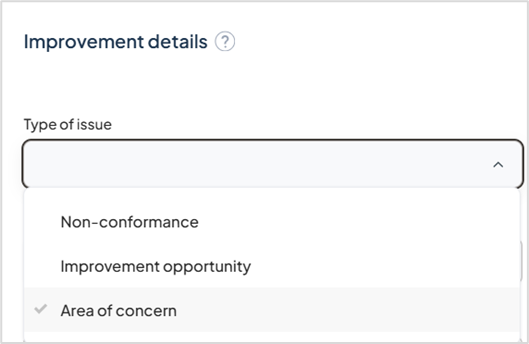
Customer suggestion: ID 628 & 618
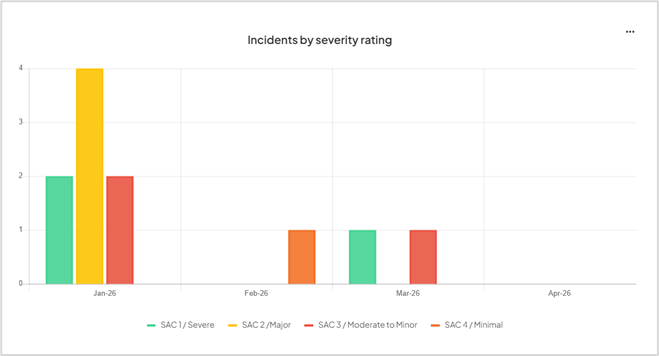
Analytics: New incidents by severity report
A new analytics report is now available to help you review incidents by severity level in one place.
This makes it easier to identify patterns, monitor incident trends, and support reporting on SAC classifications over time.
Customer suggestion: ID 637
Enhancements
Mobile: Clearer validation and easier form completion
We’ve improved the form experience in Logiqc Mobile with clearer validation messages, better ordering of validation prompts, and stronger visual cues for required fields.
These changes make incident entry easier to follow and help users understand exactly what needs attention before submitting a record.
If you haven’t downloaded the free Logiqc Mobile App, try it out here: Getting started with Logiqc Mobile
Mobile: Better usability for everyday actions
A series of mobile usability improvements have been made to everyday actions, including clearer radio button behaviour, better readability of the Save draft button, improved visibility of selected dropdown items, and a clearer delete option for new unsaved items.
Together, these updates make mobile workflows feel more intuitive and reduce friction when entering or editing information on smaller screens.
If you haven’t downloaded the free Logiqc Mobile App, try it out here: Getting started with Logiqc Mobile
Risk register: Simpler draft saving
Saving a risk in the Risk register as a draft is now more flexible.
Users can now save draft risks without needing to complete as many fields up front, making it easier to capture work in progress and return to it later. You now only need to complete the risk name and risk category fields.
Document and record views: More useful columns and exports
We’ve expanded selected list views and exports so they include more of the information customers need day to day, including the display of keywords and filenames in the register list views and exports.
Keywords are now available as a column in Documents, Contracts and Records
Filenames of published and current drafts are now available as a column in Documents
This makes it easier to identify records at a glance and work with exported data outside the platform when needed.

Contracts: Improved contract manager display
The Contracts register now more reliably shows the current contract manager, including for older records.
This helps ensure contract ownership is clearer and more consistent across existing and newly updated contracts.
Customer suggestion ID 632
System settings: Easier viewing of long position labels
In the Positions page in System Settings, position titles are now easier to view when they are long. This reduces the need to export data just to distinguish between similar position titles.
Customer suggestion ID 639
OData feed: Task descriptions now available
Task descriptions are now available through the OData task feed.
This gives customers and integration users access to more complete task information for downstream reporting and analysis.
Customer suggestion ID 267
Platform maintenance and bug fixes
- Removed incorrect totals from the Task Performance Excel export. ID 640
- Fixed an issue where raw code could appear in email notification text. ID 630