
This release makes dashboard results easier to interpret, adds clearer attribution to audit recommendations and actions, and improves progress feedback during AI-assisted incident reporting.
Enhancements
Clearer colours in dashboards and analytics
We’ve updated selected dashboard widgets and Analytics charts so their colours better reflect what the results mean. Severity charts follow the severity scale, while selected measures use colours that distinguish positive and negative results.
For example, charts using SAC ratings show SAC 1, 2, 3 and 4 in red, orange, yellow and green respectively. This helps you recognise higher-severity results when reviewing incidents and deciding where to focus attention.
Where chart series do not have a fixed colour association, the automatic palette now provides greater contrast between series, making categories easier to distinguish when comparing results.
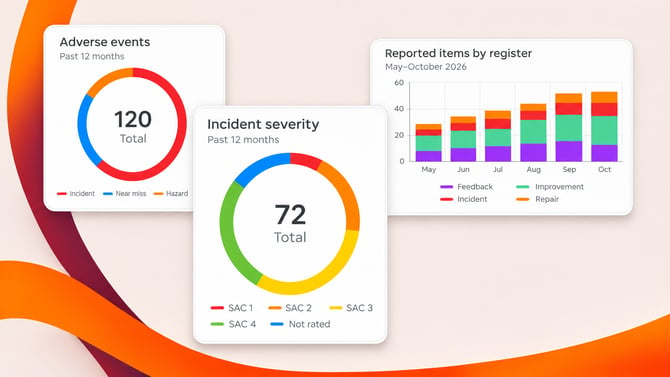
Examples of the updated chart colours. Blue identifies incidents that have not yet been rated.
See who created audit recommendations and actions
In Logiqc Auditor, recommendations and actions now show who created them. You can see the creator’s name on each recommendation, and an Added by column identifies the creator of each action in the Audit action plan.
The creator is shown separately from the person an action is assigned to. If an action needs clarification, you can identify who entered it as well as who is responsible for completing it.
Longer action descriptions also wrap within the Audit action column. This keeps the full wording readable alongside the other action details.
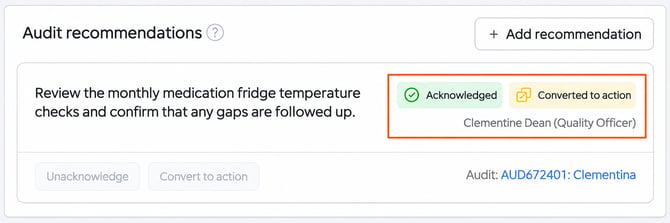
Example: the creator’s name appears beside the recommendation.
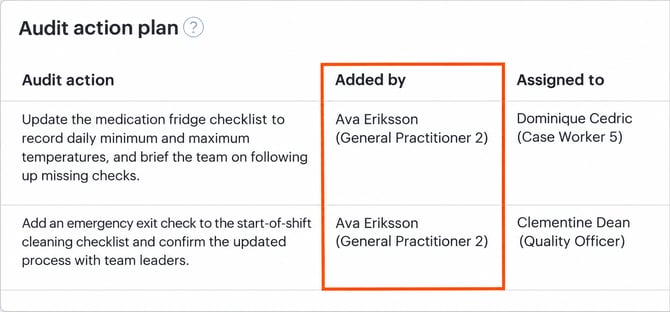
Example: Added by identifies who created the action, while Assigned to shows who is responsible for completing it.
Clearer progress during AI-assisted incident reporting
For organisations using AI-assisted incident reporting, response times have been optimised. Suggestions and their supporting reasoning now appear as individual results become available, rather than waiting for all processing to finish.
This gives you a clearer indication that work is continuing while AI prepares the incident report. If no new results arrive for more than eight seconds, an inline message lets you know that results are taking longer.
Processing time can still vary. These changes make progress and delays easier to recognise while you wait for AI to finish preparing its suggestions.
Platform maintenance and bug fixes
- Restored the Delete draft option in Logiqc Auditor. Customer request #279423696371.
- Fixed an issue preventing maintenance approvers from opening attached records they are permitted to access. Customer request #280175873496.
- Improved tab visibility on smaller screens and corrected unnecessary tab collapsing in Risk assessment.
- When linking items to accreditation standards, the selection now shows standards containing published items in your organisation’s platform, rather than the full Logiqc standards library.
- Corrected Logiqc Mobile dark mode settings becoming out of sync and restored readable text in sign-in dialogs.
- Fixed the Record owner column selection not being retained in Uploaded records. Customer request #282647347654.
- When creating a related compliance item from a contract, the originating contract is again included automatically in Compliance source documentation. Customer request #278956026357.
- Corrected related-item access checks so users can only discover, link and view items and their attached records when permitted.
- In Logiqc Auditor, rejecting an unsupported file in Add media no longer prevents you from saving or submitting the audit.